Monday, October 30, 2023

Some Information COREL DRAW, UNDERSTANDING HTML, MORE ON HTML...

 WELCOME TO OUR WEBSIITE GUYS 

CorelDRAW 

CorelDRAW is a vector graphics editor developed and marketed by Alludo (formerly Corel Corporation). It is also the name of the Corel graphics suite, which includes the bitmap-image editor Corel Photo-Paint as well as other graphics-related programs (see below). 

History[edit]

In 1987, Corel engineers Michel Bouillon and Pat Beirne undertook to develop a vector-based illustration program to bundle with their desktop publishing systems. That program, CorelDraw, was initially released in 1989.[1] CorelDraw 1.x and 2.x ran under Windows 2.x and 3.0. CorelDraw 3.0 came into its own with Microsoft's release of Windows 3.1


Main feature of CorelDRAW 
It is an all-in-one graphic design suite for vector illustration, page layout, photo editing, font management and so much more.

What is HTML?

  • HTML stands for Hyper Text Markup Language
  • HTML is the standard markup language for creating Web pages
  • HTML describes the structure of a Web page
  • HTML consists of a series of elements
  • HTML elements tell the browser how to display the content
  • HTML elements label pieces of content such as "this is a heading", "this is a paragraph", "this is a link", etc.

Basic HTML with respect to class 8

Writing Html Documents –

  • HTML codes are a combination of Tag and Attribute.
  • HTML is not case sensitive language so you can write Html tags in lowercase or uppercase letters.


Tag

  • With respect to class 8 HTML, tag is a HTML command that indicates how part of web page should be displayed.
  • These tags are enclosed with angle brackets (< >)


Attribute

  • With respect to class 8 HTML, an attribute is the keyword that specifies additional information to tag.
  • Examples - color, alignment, etc.


With respect to class 8 HTML, where to Write Html Code

  1. Open Text Editor or notepad from your computer.
  2. Type the HTML code in it.
  3. Save the file with extension .html/.htm
  4. To view the created HTML file in a browser, double click on the file.

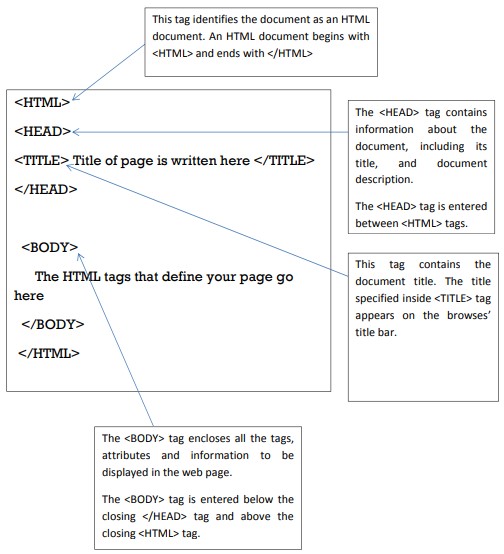
Structure of HTML DocumentYouTube

”class

 Attributes of HTML

Background attribute

  • With respect to class 8 computer lessons, this attribute allows you to make the background more presentable by adding a background image.
  • To add an image to the background

Background color, Text Color, Link Color

By default, browsers display text in black.

With respect to class 8 computer lessons, if you want to change the color or text (by TEXT attribute), color of links (by LINK attribute), color of active links (by ALINK attribute) and background color (by BGCOLOR attribute ).

 Consider the following:


- The background color is teal. (bgcolor = “teal”)

- Text color is magenta.

- Links that have not been visited recently are made yellow (link = “yellow”)

- Links that are currently being clicked on (alink = “lime”)


tag

With respect to class 8 computer lessons, it lets you change the size, style and color of the text – It is generally used for changing the appearance of a short segment of text.

Attributes of tag

(i) size: used to specify the size of the text.

(ii) color: used to change the color of text.

(iii) face: used to change the way of displaying text.

Problem: With respect to class 8 HTML, to display a paragraph on red color in size 4 but its first letter should be of size 7 and of blue color.

thanks for visite to this Website guys✌๐Ÿ‘‡๐Ÿ‘‡๐Ÿ˜‰๐Ÿ‘ ....................

๐Ÿ‘‡๐Ÿ‘‡๐Ÿ™๐Ÿ™  please support to my social media accounts


Facebookfacebook
Instagramdaviputin786
YouTubeyoutube
                                       ☝☝☝☝๐Ÿ‘๐Ÿ‘๐Ÿ˜‡

Sunday, September 25, 2022

https://www.newtree.co.in/index.php?route=checkout/success


Your order has been placed! (newtree.co.in)


thanks for visite to this Website guys✌๐Ÿ‘‡๐Ÿ‘‡๐Ÿ˜‰๐Ÿ‘ ....................

๐Ÿ‘‡๐Ÿ‘‡๐Ÿ™๐Ÿ™  please support to my social media accounts


Facebookfacebook
Instagramdaviputin786
YouTubeyoutube
                                       ☝☝☝☝๐Ÿ‘๐Ÿ‘๐Ÿ˜‡

Friday, July 23, 2021

Wrapper classes

Chapter - 4 

Lesson name - Library classes 

Ques:-1 What's a wrapper classes ?

Ans:- A Wrapper class is a class whose object wraps or contains primitive data types. When we create an object to a wrapper class, it contains a field and in this field, we can store primitive data types. In other words, we can wrap a primitive value into a wrapper class object.'


Need of Wrapper Classes

  1. They convert primitive data types into objects. Objects are needed if we wish to modify the arguments passed into a method. 
  2. The classes in java.util package handles only objects and hence wrapper classes help in this case also.
  3. An object is needed to support synchronization in multithreading.

Primitive Data types and their Corresponding Wrapper class
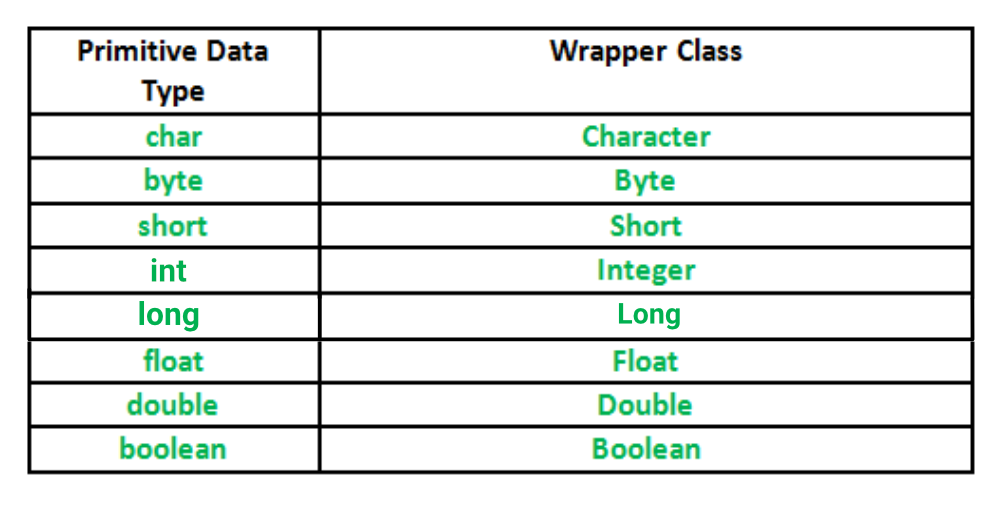
Wrapper-Class-in-Java

Implementation

// Java program to demonstrate Wrapping and UnWrapping
// in Java Classes
class WrappingUnwrapping
{
    public static void main(String args[])
    {
        //  byte data type
        byte a = 1;
  
        // wrapping around Byte object
        Byte byteobj = new Byte(a);
  
        // int data type
        int b = 10;
  
        //wrapping around Integer object
        Integer intobj = new Integer(b);
  
        // float data type
        float c = 18.6f;
  
        // wrapping around Float object
        Float floatobj = new Float(c);
  
        // double data type
        double d = 250.5;
  
        // Wrapping around Double object
        Double doubleobj = new Double(d);
  
        // char data type
        char e='a';
  
        // wrapping around Character object
        Character charobj=e;
  
        //  printing the values from objects
        System.out.println("Values of Wrapper objects (printing as objects)");
        System.out.println("Byte object byteobj:  " + byteobj);
        System.out.println("Integer object intobj:  " + intobj);
        System.out.println("Float object floatobj:  " + floatobj);
        System.out.println("Double object doubleobj:  " + doubleobj);
        System.out.println("Character object charobj:  " + charobj);
  
        // objects to data types (retrieving data types from objects)
        // unwrapping objects to primitive data types
        byte bv = byteobj;
        int iv = intobj;
        float fv = floatobj;
        double dv = doubleobj;
        char cv = charobj;
  
        // printing the values from data types
        System.out.println("Unwrapped values (printing as data types)");
        System.out.println("byte value, bv: " + bv);
        System.out.println("int value, iv: " + iv);
        System.out.println("float value, fv: " + fv);
        System.out.println("double value, dv: " + dv);
        System.out.println("char value, cv: " + cv);
    }
}

Output:

Values of Wrapper objects (printing as objects)
Byte object byteobj:  1
Integer object intobj:  10
Float object floatobj:  18.6
Double object doubleobj:  250.5
Character object charobj: a
Unwrapped values (printing as data types)
byte value, bv: 1
int value, iv: 10
float value, fv: 18.6
double value, dv: 250.5
char value, cv: a

Methods of wrapper classes - 

Below table lists wrapper classes in Java API with constructor details.

PrimitiveWrapper ClassConstructor Argument
booleanBooleanboolean or String
byteBytebyte or String
charCharacterchar
intIntegerint or String
floatFloatfloat, double or String
doubleDoubledouble or String
longLonglong or String
shortShortshort or String

Below is wrapper class hierarchy as per Java API
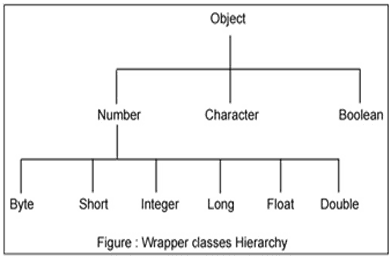
wrapper class image 1

The most common methods of the Integer wrapper class are summarized in below table. Similar methods for the other wrapper classes are found in the Java API documentation.

MethodPurpose
parseInt(s)

returns a signed decimal integer value equivalent to string s

toString(i)returns a new String object representing the integer i
byteValue()returns the value of this Integer as a byte
doubleValue()returns the value of this Integer as a double
floatValue()returns the value of this Integer as a float
intValue()returns the value of this Integer as an int
shortValue()returns the value of this Integer as a short
longValue()returns the value of this Integer as a long
int compareTo(int i)Compares the numerical value of the invoking object with that of i. Returns 0 if the values are equal. Returns a negative value if the invoking object has a lower value. Returns a positive value if the invoking object has a greater value.
static int compare(int num1, int num2)Compares the values of num1 and num2. Returns 0 if the values are equal. Returns a negative value if num1 is less than num2. Returns a positive value if num1 is greater than num2.
boolean equals(Object intObj)Returns true if the invoking Integer object is equivalent to intObj. Otherwise, it returns false.


This is the same example as your first example


HOW TO CONNECT HOSTING

  เค•िเคธी เคกोเคฎेเคจ เค•ो เคธเคฐ्เคตเคฐ เคฏा เคนोเคธ्เคŸिंเค— เคธे เค•ैเคธे เค•เคจेเค•्เคŸ เค•เคฐें เคกोเคฎेเคจ เคจाเคฎ เคธेเคŸ เค•เคฐเคจा  เค†เคชเค•े เคตिเคšाเคฐ เคธे เค•เคนीं เคœ़्เคฏाเคฆा เค†เคธाเคจ เคนो เคธเค•เคคा เคนै। เคเค• เคฌाเคฐ เค†เคชเค•ा เคกोเคฎेเคจ เคจाเคฎ ...