Friday, July 23, 2021

Wrapper classes

Chapter - 4 

Lesson name - Library classes 

Ques:-1 What's a wrapper classes ?

Ans:- A Wrapper class is a class whose object wraps or contains primitive data types. When we create an object to a wrapper class, it contains a field and in this field, we can store primitive data types. In other words, we can wrap a primitive value into a wrapper class object.'


Need of Wrapper Classes

  1. They convert primitive data types into objects. Objects are needed if we wish to modify the arguments passed into a method. 
  2. The classes in java.util package handles only objects and hence wrapper classes help in this case also.
  3. An object is needed to support synchronization in multithreading.

Primitive Data types and their Corresponding Wrapper class
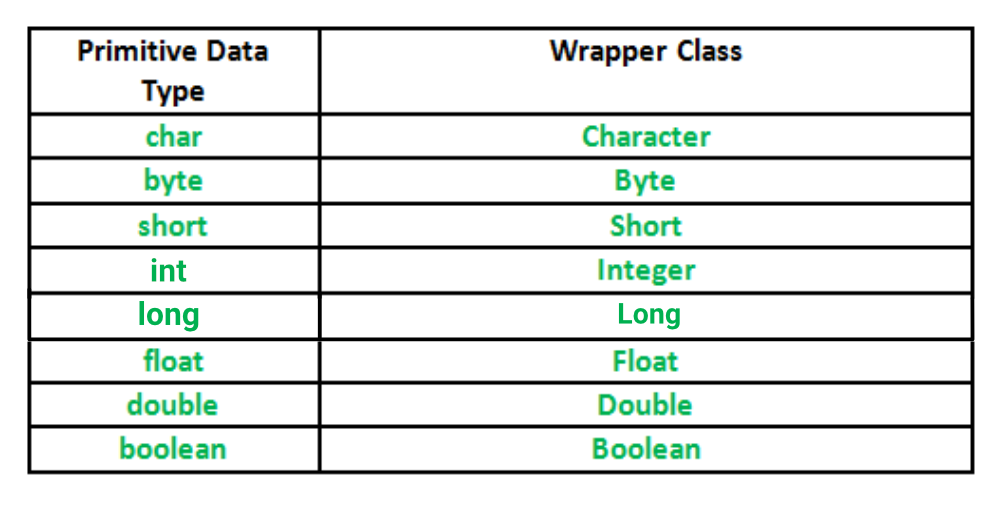
Wrapper-Class-in-Java

Implementation

// Java program to demonstrate Wrapping and UnWrapping
// in Java Classes
class WrappingUnwrapping
{
    public static void main(String args[])
    {
        //  byte data type
        byte a = 1;
  
        // wrapping around Byte object
        Byte byteobj = new Byte(a);
  
        // int data type
        int b = 10;
  
        //wrapping around Integer object
        Integer intobj = new Integer(b);
  
        // float data type
        float c = 18.6f;
  
        // wrapping around Float object
        Float floatobj = new Float(c);
  
        // double data type
        double d = 250.5;
  
        // Wrapping around Double object
        Double doubleobj = new Double(d);
  
        // char data type
        char e='a';
  
        // wrapping around Character object
        Character charobj=e;
  
        //  printing the values from objects
        System.out.println("Values of Wrapper objects (printing as objects)");
        System.out.println("Byte object byteobj:  " + byteobj);
        System.out.println("Integer object intobj:  " + intobj);
        System.out.println("Float object floatobj:  " + floatobj);
        System.out.println("Double object doubleobj:  " + doubleobj);
        System.out.println("Character object charobj:  " + charobj);
  
        // objects to data types (retrieving data types from objects)
        // unwrapping objects to primitive data types
        byte bv = byteobj;
        int iv = intobj;
        float fv = floatobj;
        double dv = doubleobj;
        char cv = charobj;
  
        // printing the values from data types
        System.out.println("Unwrapped values (printing as data types)");
        System.out.println("byte value, bv: " + bv);
        System.out.println("int value, iv: " + iv);
        System.out.println("float value, fv: " + fv);
        System.out.println("double value, dv: " + dv);
        System.out.println("char value, cv: " + cv);
    }
}

Output:

Values of Wrapper objects (printing as objects)
Byte object byteobj:  1
Integer object intobj:  10
Float object floatobj:  18.6
Double object doubleobj:  250.5
Character object charobj: a
Unwrapped values (printing as data types)
byte value, bv: 1
int value, iv: 10
float value, fv: 18.6
double value, dv: 250.5
char value, cv: a

Methods of wrapper classes - 

Below table lists wrapper classes in Java API with constructor details.

PrimitiveWrapper ClassConstructor Argument
booleanBooleanboolean or String
byteBytebyte or String
charCharacterchar
intIntegerint or String
floatFloatfloat, double or String
doubleDoubledouble or String
longLonglong or String
shortShortshort or String

Below is wrapper class hierarchy as per Java API
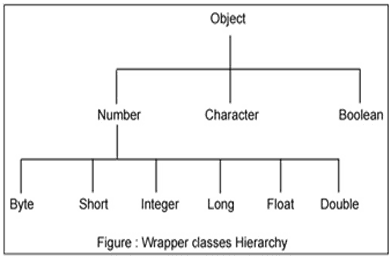
wrapper class image 1

The most common methods of the Integer wrapper class are summarized in below table. Similar methods for the other wrapper classes are found in the Java API documentation.

MethodPurpose
parseInt(s)

returns a signed decimal integer value equivalent to string s

toString(i)returns a new String object representing the integer i
byteValue()returns the value of this Integer as a byte
doubleValue()returns the value of this Integer as a double
floatValue()returns the value of this Integer as a float
intValue()returns the value of this Integer as an int
shortValue()returns the value of this Integer as a short
longValue()returns the value of this Integer as a long
int compareTo(int i)Compares the numerical value of the invoking object with that of i. Returns 0 if the values are equal. Returns a negative value if the invoking object has a lower value. Returns a positive value if the invoking object has a greater value.
static int compare(int num1, int num2)Compares the values of num1 and num2. Returns 0 if the values are equal. Returns a negative value if num1 is less than num2. Returns a positive value if num1 is greater than num2.
boolean equals(Object intObj)Returns true if the invoking Integer object is equivalent to intObj. Otherwise, it returns false.


This is the same example as your first example


Sunday, July 18, 2021

 Chapter - 2 

Computer Hardware 

Basic Logic Gates

Logic gates are an important concept if you are studying electronics. These are important digital devices that are mainly based on the Boolean function. Logic gates are used to carry out logical operations on single or multiple binary inputs and give one binary output. In simple terms, logic gates are the electronic circuits in a digital system.

Types of Basic Logic Gates

There are several basic logic gates used in performing operations in digital systems. The common ones are;

  • OR Gate
  • AND Gate
  • NOT Gate
  • XOR Gate

Additionally, these gates can also be found in a combination of one or two. Therefore we get other gates such as NAND Gate, NOR Gate, EXOR Gate, EXNOR Gate.

Also Read: Transistor

OR Gate

In OR gate the output of an OR gate attains the state 1 if one or more inputs attain the state 1.

The Boolean expression of OR gate is Y = A + B, read as Y equals A ‘OR’ B.

The truth table of a two-input OR basic gate is given as;

ABY
000
011
101
111

AND Gate

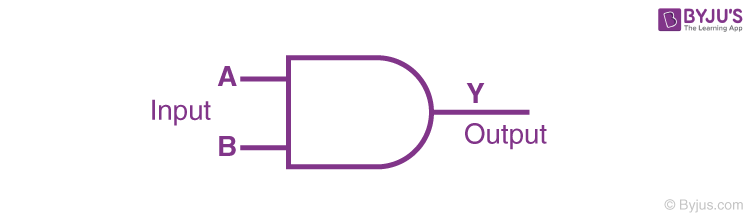
In AND gate the output of an AND gate attains the state 1 if and only if all the inputs are in state 1.

Logic Symbol of AND Gate


The Boolean expression of AND gate is Y = A.B

The truth table of a two-input AND basic gate is given as;

ABY
000
010
100
111

NOT Gate

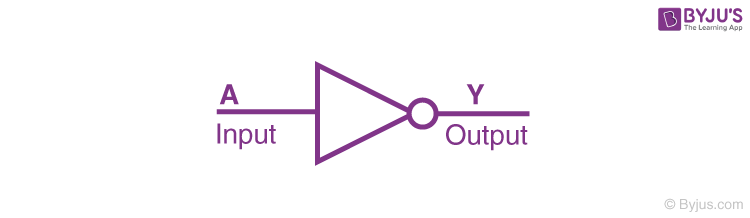
In NOT gate the output of a NOT gate attains the state 1 if and only if the input does not attain the state 1.

Logic Symbol of NOT gate


The Boolean expression is Y = [latex]\bar{A}[/latex], read as Y equals NOT A.

The truth table of NOT gate is as follows;

AY
01
10

The three gates (OR, AND and NOT), when connected in various combinations, give us basic logic gates such as NAND, NOR gates, which are the universal building blocks of digital circuits.

NAND Gate

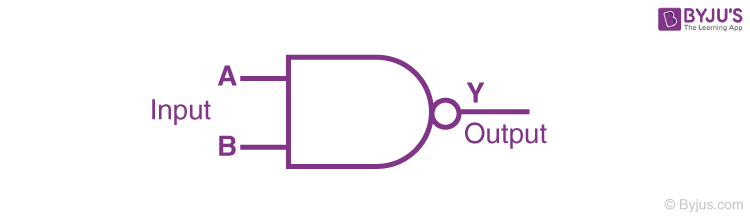
This basic logic gate is the combination of AND and NOT gate.

Logic Symbol of NAND gate


The Boolean expression of NAND gate is Y = [latex]\bar{A.B}[/latex]

The truth table of a NAND gate is given as;

ABY
001
011
101
110

NOR Gate

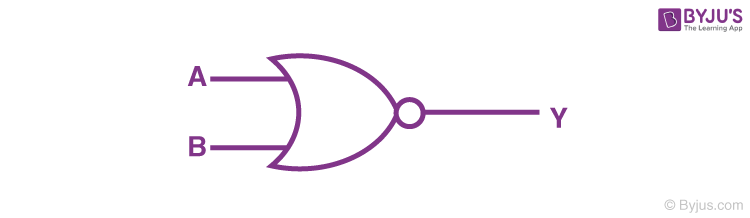
This gate is the combination of OR and NOT gate.

Logic Symbol of NOR


The Boolean expression of NOR gate is Y = [latex]\bar{A+B}[/latex]

The truth table of a NOR gate is as follows;

ABY
001
010
100
110

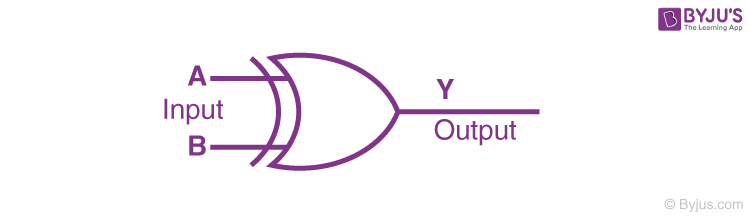
Exclusive-OR gate (XOR Gate)

In XOR gate the output of a two-input XOR gate attains the state 1 if one adds only input attains the state 1.

Logic Symbol of XOR gate


The Boolean expression of the XOR gate is [latex]A.\bar{B}+\bar{A}.B[/latex] or
[latex]Y = A \bigoplus B[/latex]

The truth table of an XOR gate is;

ABY
000
011
101
110

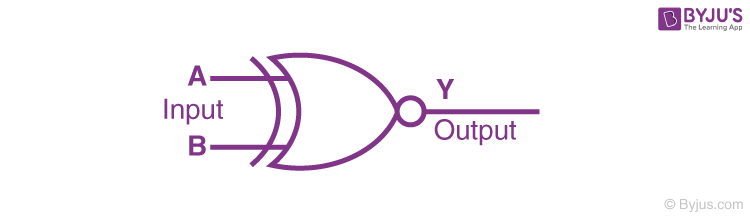
Exclusive-NOR Gate (XNOR Gate)

In XNOR gate the output is in state 1 when its both inputs are the same that is, both 0 or both 1.

Logic Symbol of XNOR gate


The Boolean expression of XNOR gate XNOR gate Boolean expression JEE

The truth table of an XNOR gate is given below;

ABY
001
010
100
111


Introduction to Algorithms

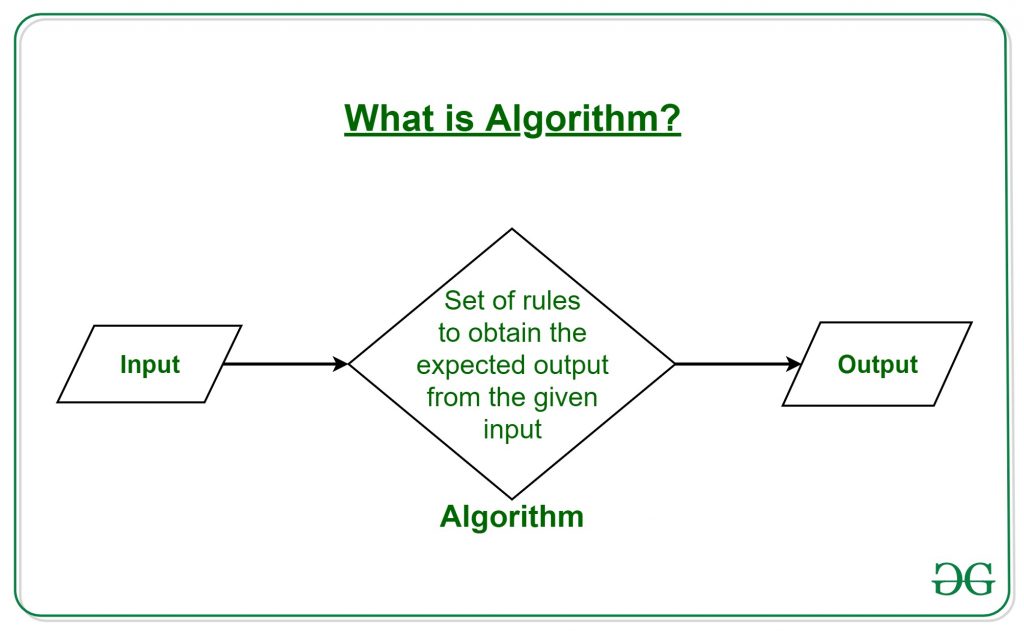
  • What is Algorithm? Algorithm Basics

The word Algorithm means “a process or set of rules to be followed in calculations or other problem-solving operations”. Therefore Algorithm refers to a set of rules/instructions that step-by-step define how a work is to be executed upon in order to get the expected results. 

It can be understood by taking an example of cooking a new recipe. To cook a new recipe, one reads the instructions and steps and execute them one by one, in the given sequence. The result thus obtained is the new dish cooked perfectly. Similarly, algorithms help to do a task in programming to get the expected output.
The Algorithm designed are language-independent, i.e. they are just plain instructions that can be implemented in any language, and yet the output will be the same, as expected.
 
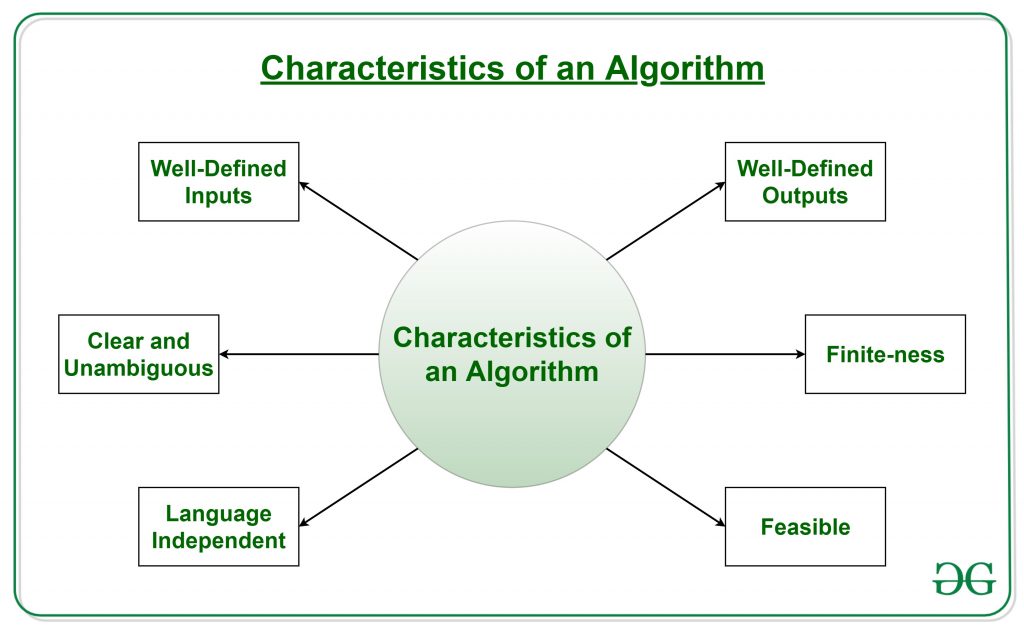
What are the Characteristics of an Algorithm?

As one would not follow any written instructions to cook the recipe, but only the standard one. Similarly, not all written instructions for programming is an algorithm. In order for some instructions to be an algorithm, it must have the following characteristics

  • Language Independent: The Algorithm designed must be language-independent, i.e. it must be just plain instructions that can be implemented in any language, and yet the output will be same, as expected.

Advantages of Algorithms:

  • It is easy to understand.
  • Algorithm is a step-wise representation of a solution to a given problem.
  • In Algorithm the problem is broken down into smaller pieces or steps hence, it is easier for the programmer to convert it into an actual program.

Disadvantages of Algorithms:

  • Writing an algorithm takes a long time so it is time-consuming.
  • Branching and Looping statements are difficult to show in Algorithms.

thanks for visite to this Website guys✌๐Ÿ‘‡๐Ÿ‘‡๐Ÿ˜‰๐Ÿ‘ ....................

๐Ÿ‘‡๐Ÿ‘‡๐Ÿ™๐Ÿ™  please support to my social media accounts


Facebookfacebook
Instagramdaviputin786
YouTubeyoutube
                                       ☝☝☝☝๐Ÿ‘๐Ÿ‘๐Ÿ˜‡

Monday, July 12, 2021

 Introduction to Java programming

1.1. A small history of Java

Java is a programming language created by James Gosling from Sun Microsystems (Sun) in 1991. The target of Java is to write a program once and then run this program on multiple operating systems. The first publicly available version of Java (Java 1.0) was released in 1995. Sun Microsystems was acquired by the Oracle Corporation in 2010. Oracle has now the steermanship for Java. In 2006 Sun started to make Java available under the GNU General Public License (GPL). 

Java is defined by a specification and consists of a programming language, a compiler, core libraries and a runtime

The Java language was designed with the following properties:

  • Platform independent
  • Object-orientated programming language
  • Strongly-typed programming language
  • Interpreted and compiled language
  • Automatic memory management

1.2. Hello world Java program

// a small Java program
public class HelloWorld {
    public static void main(String[] args) {
        System.out.println("Hello World");
    }
}

HOW TO CONNECT HOSTING

  เค•िเคธी เคกोเคฎेเคจ เค•ो เคธเคฐ्เคตเคฐ เคฏा เคนोเคธ्เคŸिंเค— เคธे เค•ैเคธे เค•เคจेเค•्เคŸ เค•เคฐें เคกोเคฎेเคจ เคจाเคฎ เคธेเคŸ เค•เคฐเคจा  เค†เคชเค•े เคตिเคšाเคฐ เคธे เค•เคนीं เคœ़्เคฏाเคฆा เค†เคธाเคจ เคนो เคธเค•เคคा เคนै। เคเค• เคฌाเคฐ เค†เคชเค•ा เคกोเคฎेเคจ เคจाเคฎ ...