Sunday, July 18, 2021

 Chapter - 2 

Computer Hardware 

Basic Logic Gates

Logic gates are an important concept if you are studying electronics. These are important digital devices that are mainly based on the Boolean function. Logic gates are used to carry out logical operations on single or multiple binary inputs and give one binary output. In simple terms, logic gates are the electronic circuits in a digital system.

Types of Basic Logic Gates

There are several basic logic gates used in performing operations in digital systems. The common ones are;

  • OR Gate
  • AND Gate
  • NOT Gate
  • XOR Gate

Additionally, these gates can also be found in a combination of one or two. Therefore we get other gates such as NAND Gate, NOR Gate, EXOR Gate, EXNOR Gate.

Also Read: Transistor

OR Gate

In OR gate the output of an OR gate attains the state 1 if one or more inputs attain the state 1.

The Boolean expression of OR gate is Y = A + B, read as Y equals A ‘OR’ B.

The truth table of a two-input OR basic gate is given as;

ABY
000
011
101
111

AND Gate

In AND gate the output of an AND gate attains the state 1 if and only if all the inputs are in state 1.
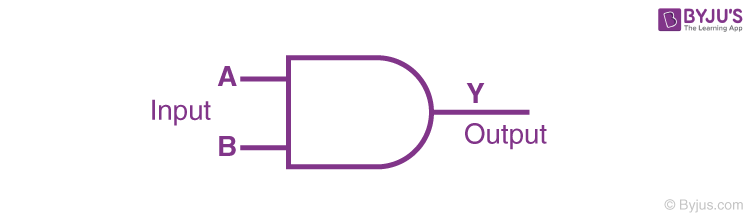
Logic Symbol of AND Gate


The Boolean expression of AND gate is Y = A.B

The truth table of a two-input AND basic gate is given as;

ABY
000
010
100
111

NOT Gate

In NOT gate the output of a NOT gate attains the state 1 if and only if the input does not attain the state 1.

Logic Symbol of NOT gate


The Boolean expression is Y = [latex]\bar{A}[/latex], read as Y equals NOT A.

The truth table of NOT gate is as follows;

AY
01
10

The three gates (OR, AND and NOT), when connected in various combinations, give us basic logic gates such as NAND, NOR gates, which are the universal building blocks of digital circuits.

NAND Gate

This basic logic gate is the combination of AND and NOT gate.
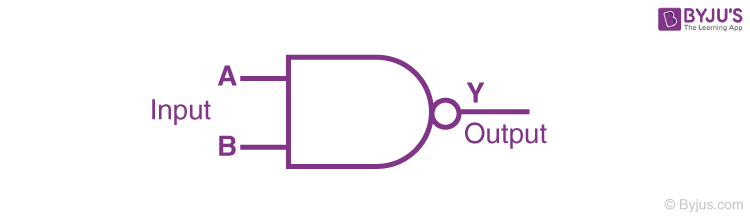
Logic Symbol of NAND gate


The Boolean expression of NAND gate is Y = [latex]\bar{A.B}[/latex]

The truth table of a NAND gate is given as;

ABY
001
011
101
110

NOR Gate

This gate is the combination of OR and NOT gate.
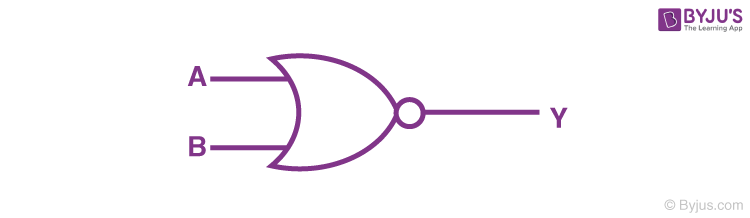
Logic Symbol of NOR


The Boolean expression of NOR gate is Y = [latex]\bar{A+B}[/latex]

The truth table of a NOR gate is as follows;

ABY
001
010
100
110

Exclusive-OR gate (XOR Gate)

In XOR gate the output of a two-input XOR gate attains the state 1 if one adds only input attains the state 1.
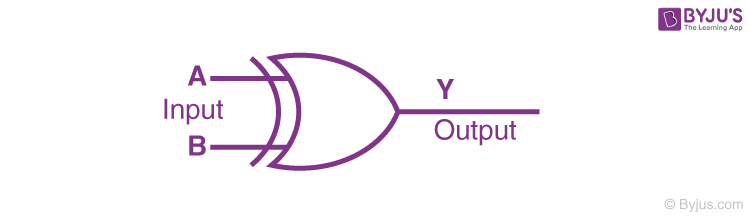
Logic Symbol of XOR gate


The Boolean expression of the XOR gate is [latex]A.\bar{B}+\bar{A}.B[/latex] or
[latex]Y = A \bigoplus B[/latex]

The truth table of an XOR gate is;

ABY
000
011
101
110

Exclusive-NOR Gate (XNOR Gate)

In XNOR gate the output is in state 1 when its both inputs are the same that is, both 0 or both 1.
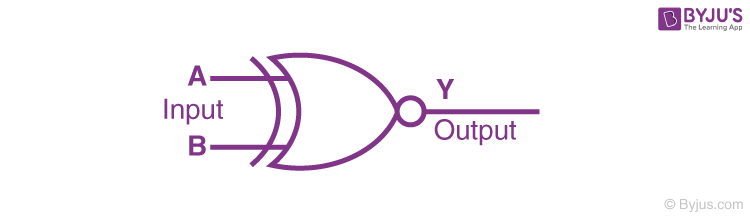
Logic Symbol of XNOR gate


The Boolean expression of XNOR gate XNOR gate Boolean expression JEE

The truth table of an XNOR gate is given below;

ABY
001
010
100
111


Introduction to Algorithms

  • What is Algorithm? Algorithm Basics

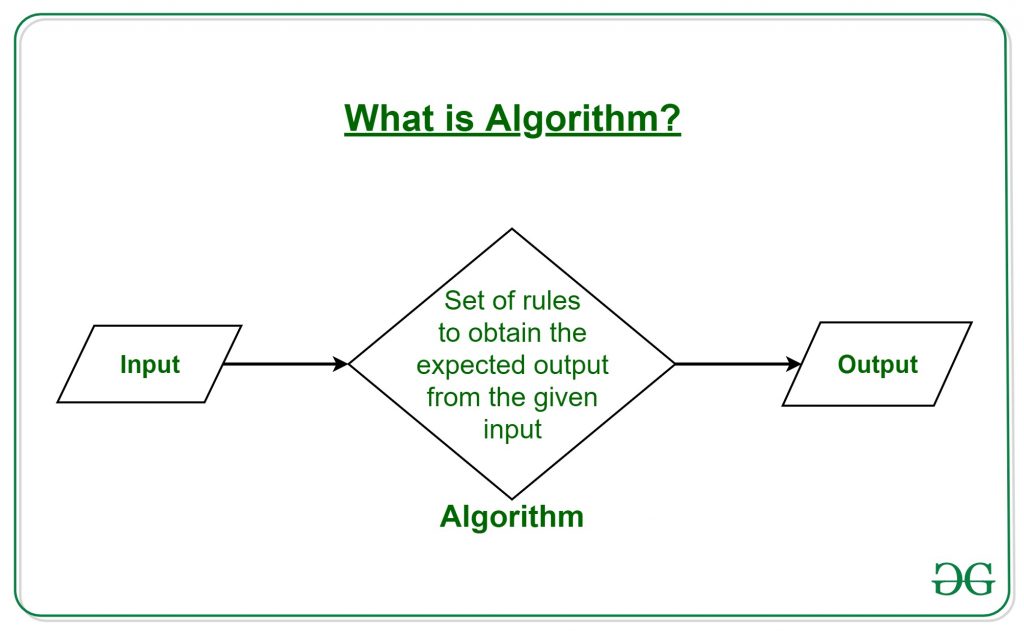
The word Algorithm means “a process or set of rules to be followed in calculations or other problem-solving operations”. Therefore Algorithm refers to a set of rules/instructions that step-by-step define how a work is to be executed upon in order to get the expected results. 

It can be understood by taking an example of cooking a new recipe. To cook a new recipe, one reads the instructions and steps and execute them one by one, in the given sequence. The result thus obtained is the new dish cooked perfectly. Similarly, algorithms help to do a task in programming to get the expected output.
The Algorithm designed are language-independent, i.e. they are just plain instructions that can be implemented in any language, and yet the output will be the same, as expected.
 
What are the Characteristics of an Algorithm?

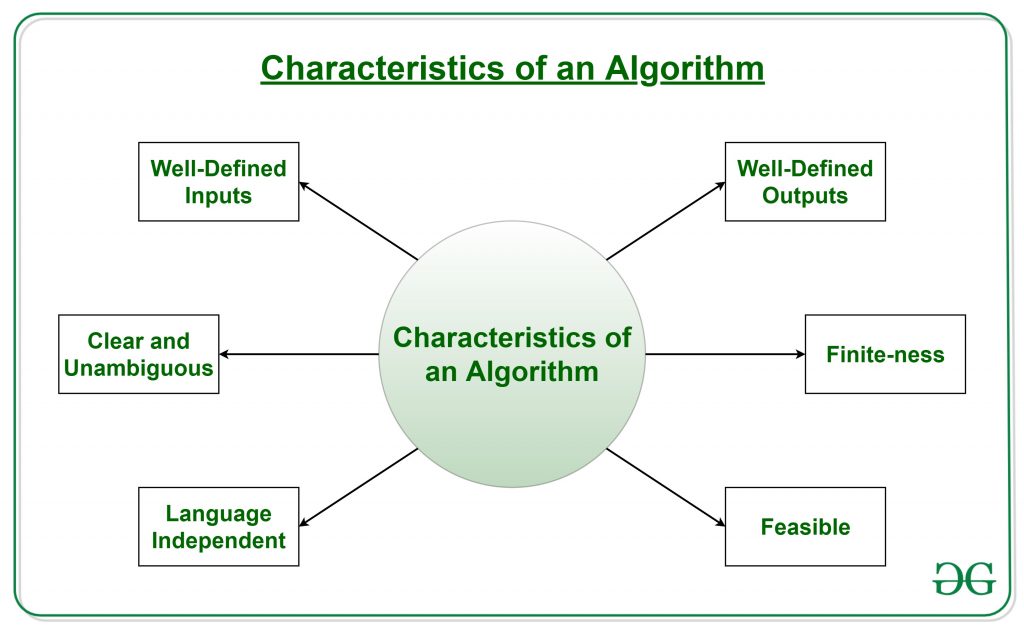
As one would not follow any written instructions to cook the recipe, but only the standard one. Similarly, not all written instructions for programming is an algorithm. In order for some instructions to be an algorithm, it must have the following characteristics

  • Language Independent: The Algorithm designed must be language-independent, i.e. it must be just plain instructions that can be implemented in any language, and yet the output will be same, as expected.

Advantages of Algorithms:

  • It is easy to understand.
  • Algorithm is a step-wise representation of a solution to a given problem.
  • In Algorithm the problem is broken down into smaller pieces or steps hence, it is easier for the programmer to convert it into an actual program.

Disadvantages of Algorithms:

  • Writing an algorithm takes a long time so it is time-consuming.
  • Branching and Looping statements are difficult to show in Algorithms.

thanks for visite to this Website guys✌๐Ÿ‘‡๐Ÿ‘‡๐Ÿ˜‰๐Ÿ‘ ....................

๐Ÿ‘‡๐Ÿ‘‡๐Ÿ™๐Ÿ™  please support to my social media accounts


Facebookfacebook
Instagramdaviputin786
YouTubeyoutube
                                       ☝☝☝☝๐Ÿ‘๐Ÿ‘๐Ÿ˜‡

Monday, July 12, 2021

 Introduction to Java programming

1.1. A small history of Java

Java is a programming language created by James Gosling from Sun Microsystems (Sun) in 1991. The target of Java is to write a program once and then run this program on multiple operating systems. The first publicly available version of Java (Java 1.0) was released in 1995. Sun Microsystems was acquired by the Oracle Corporation in 2010. Oracle has now the steermanship for Java. In 2006 Sun started to make Java available under the GNU General Public License (GPL). 

Java is defined by a specification and consists of a programming language, a compiler, core libraries and a runtime

The Java language was designed with the following properties:

  • Platform independent
  • Object-orientated programming language
  • Strongly-typed programming language
  • Interpreted and compiled language
  • Automatic memory management

1.2. Hello world Java program

// a small Java program
public class HelloWorld {
    public static void main(String[] args) {
        System.out.println("Hello World");
    }
}

Friday, July 9, 2021


Character Set

The character set is a set of alphabets, letters and some special characters that are valid in Java language.

The smallest unit of Java language is the characters need to write java tokens.

These character set are defined by Unicode character set.

Whenever we write any Java program then it consists of different statements. Each Java Program is set of statements and each statement is set of different Java programming lexemes. In Java Programming each and every character is considered as a single lexeme. i.e Basic Lexical Element.

Character Set Consists Of

Alphabets

C abd Java accepts both lowercase and uppercase alphabets as variables and functions.

Uppercase: A B C ................................... X Y Z
Lowercase: a b c ...................................... x y z

Digits

 0 1 2 3 4 5 6 7 8 9 

Special Characters

 +  _  (  )  {  }  [   ]  \  |  /  >   < ;   etc.  

Valid C and Java Characters : Special Characters are listed below

SymbolMeaning
 ~ Tilde
 !Exclamation mark
 #Number sign
 $Dollar sign
%Percent sign
 ^Caret
 &Ampersand
  *Asterisk
(Left parenthesis
 )Right parenthesis
_Underscore
 +Plus sign
 | Vertical bar
  \ Backslash
 ` Apostrophe
 – Minus sign
 = Equal to sign
  { Left brace
  } Right brace
 [ Left bracket
] Right bracket
 :  Colon
 ” Quotation mark
 ; Semicolon
 < Opening angle bracket
 > Closing angle bracket
  ? Question mark
 , Comma
 .Period
  / Slash

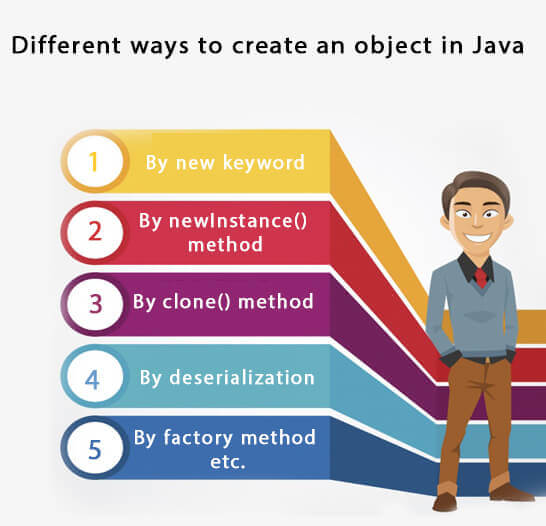
We will learn these ways to create object later.

Different Ways to create an Object in Java

Objects and Classes in Java

In this page, we will learn about Java objects and classes. In object-oriented programming technique, we design a program using objects and classes.

An object in Java is the physical as well as a logical entity, whereas, a class in Java is a logical entity only.

What is an object in Java

object in Java

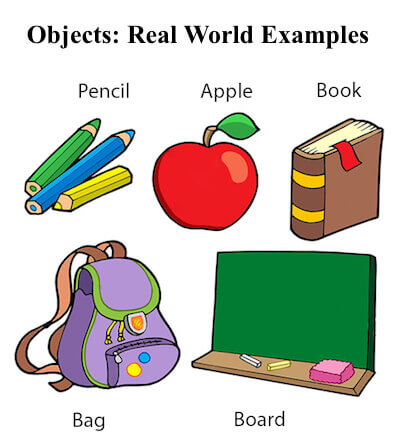
An entity that has state and behavior is known as an object e.g., chair, bike, marker, pen, table, car, etc. It can be physical or logical (tangible and intangible). The example of an intangible object is the banking system.

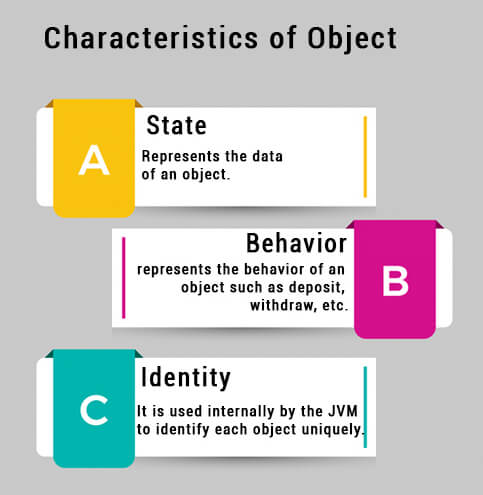
An object has three characteristics:

  • State: represents the data (value) of an object.
  • Behavior: represents the behavior (functionality) of an object such as deposit, withdraw, etc.
  • Identity: An object identity is typically implemented via a unique ID. The value of the ID is not visible to the external user. However, it is used internally by the JVM to identify each object uniquely.
Characteristics of Object in Java

For Example, Pen is an object. Its name is Reynolds; color is white, known as its state. It is used to write, so writing is its behavior.

An object is an instance of a class. A class is a template or blueprint from which objects are created. So, an object is the instance(result) of a class.

Object Definitions:

  • An object is a real-world entity.
  • An object is a runtime entity.
  • The object is an entity which has state and behavior.
  • The object is an instance of a class.

What is a class in Java

A class is a group of objects which have common properties. It is a template or blueprint from which objects are created. It is a logical entity. It can't be physical.

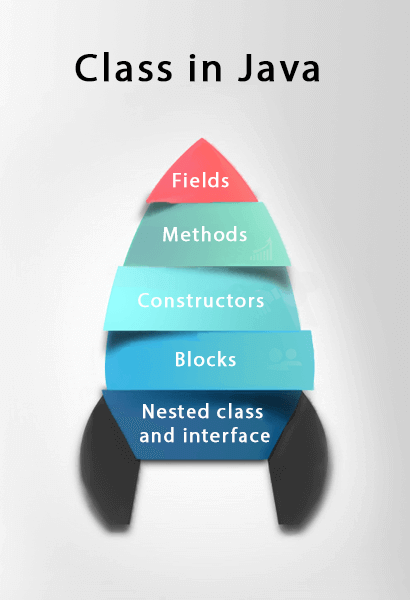
A class in Java can contain:

  • Fields
  • Methods
  • Constructors
  • Blocks
  • Nested class and interface
Class in Java

Syntax to declare a class:

  1. class <class_name>{  
  2.     field;  
  3.     method;  
  4. }  

Instance variable in Java

A variable which is created inside the class but outside the method is known as an instance variable. Instance variable doesn't get memory at compile time. It gets memory at runtime when an object or instance is created. That is why it is known as an instance variable.


Method in Java

In Java, a method is like a function which is used to expose the behavior of an object.

Advantage of Method

  • Code Reusability
  • Code Optimization

new keyword in Java

The new keyword is used to allocate memory at runtime. All objects get memory in Heap memory area.


Object and Class Example: main within the class

In this example, we have created a Student class which has two data members id and name. We are creating the object of the Student class by new keyword and printing the object's value.

Here, we are creating a main() method inside the class.

File: Student.java

  1. //Java Program to illustrate how to define a class and fields  
  2. //Defining a Student class.  
  3. class Student{  
  4.  //defining fields  
  5.  int id;//field or data member or instance variable  
  6.  String name;  
  7.  //creating main method inside the Student class  
  8.  public static void main(String args[]){  
  9.   //Creating an object or instance  
  10.   Student s1=new Student();//creating an object of Student  
  11.   //Printing values of the object  
  12.   System.out.println(s1.id);//accessing member through reference variable  
  13.   System.out.println(s1.name);  
  14.  }  
  15. }  
Test it Now

Output:

0 
null


Object and Class Example: main outside the class

In real time development, we create classes and use it from another class. It is a better approach than previous one. Let's see a simple example, where we are having main() method in another class.

We can have multiple classes in different Java files or single Java file. If you define multiple classes in a single Java source file, it is a good idea to save the file name with the class name which has main() method.

File: TestStudent1.java

  1. //Java Program to demonstrate having the main method in   
  2. //another class  
  3. //Creating Student class.  
  4. class Student{  
  5.  int id;  
  6.  String name;  
  7. }  
  8. //Creating another class TestStudent1 which contains the main method  
  9. class TestStudent1{  
  10.  public static void main(String args[]){  
  11.   Student s1=new Student();  
  12.   System.out.println(s1.id);  
  13.   System.out.println(s1.name);  
  14.  }  
  15. }  
Test it Now

Output:

0 
null

Thursday, June 17, 2021

Window 11 will be launch soon.

David Putin ( (7) David Putin | Facebook )

 (M) Microsoft’s upcoming event on June 24 will be all about the next-generation Windows. Although the software giant has not revealed what this upcoming version of Windows is going to be, it looks like the days of Windows 10 will soon be over. Everything available as evidence points to Windows 11, which will replace the long-running Windows 10 as the new platform for PCs. Microsoft has already teased that the next Windows will be visually better and rid of the Windows 95-era icons, but besides the visual overhaul, the next Windows is going to be important as software for the next-generation devices.

Back when Windows 10 arrived, Microsoft said it would not upgrade the Windows version anymore. However, instead, it would change the elements of the operating system to make it up-to-date. And even though Microsoft has not confirmed yet that the next-generation Windows will bring an end to Windows 10, there are certain hints to pick. For example, Microsoft’s June 24 event will kick off at 11 am ET. If this does not give you a hint that the next OS could be Windows 11, you cannot ignore the fact that there is no time conversion for the PT zone. This event is going to be an important one, given both Microsoft CEO Satya Nadella and chief product officer Panos Panay will be presenting it.Nadella previously created the hype around this next generation of Windows by saying that it is going to be the biggest update to Windows in more than a decade. A lot of focus was on developers and creators that are going to find this upcoming version of Windows a lot more productive. Although the specifics are not available, Nadella may be hinting at better compatibility for various formats, support for more advanced technologies and access to tools that creators mostly find useful. Whatever is in the pipeline for Windows 11, rumours suggest that it will be available under Sun Valley, a codename for the update that has been doing rounds on the internet for quite some time.


Sun Valley will bring an overhauled Microsoft Store with probably better design, support for more app structures, and third-party payments systems. And if Microsoft is actually trying to take on Apple, according to the current discourse, it may even lower the commission on purchases made through the Microsoft Store. There may be support for more Android apps that will run on Windows without the need for emulators, alongside support for big-time apps such as Google Chrome that you cannot find in the Microsoft Store right now.


Functionality-wise, Windows 11 is going to take inspiration from Windows 10X, which Microsoft killed last month. Windows 10X was going to be a platform meant for dual-screen devices, such as the Microsoft Surface Neo, but later, the company changed the focus of the OS to support only single-screen laptops. And now that it is cancelled, Microsoft confirmed it is going to use its learnings from Windows 10X and implement them in the next generation of Windows. This means we can see Windows 11-powered foldables and devices with unconventional form factors.

Windows 11 will probably be out by fall this year, typically following the Windows version rollout schedule from the past.๐Ÿ‘๐Ÿ’ค

HOW TO CONNECT HOSTING

  เค•िเคธी เคกोเคฎेเคจ เค•ो เคธเคฐ्เคตเคฐ เคฏा เคนोเคธ्เคŸिंเค— เคธे เค•ैเคธे เค•เคจेเค•्เคŸ เค•เคฐें เคกोเคฎेเคจ เคจाเคฎ เคธेเคŸ เค•เคฐเคจा  เค†เคชเค•े เคตिเคšाเคฐ เคธे เค•เคนीं เคœ़्เคฏाเคฆा เค†เคธाเคจ เคนो เคธเค•เคคा เคนै। เคเค• เคฌाเคฐ เค†เคชเค•ा เคกोเคฎेเคจ เคจाเคฎ ...